What's My Face Shape? How to Tell From a Photo
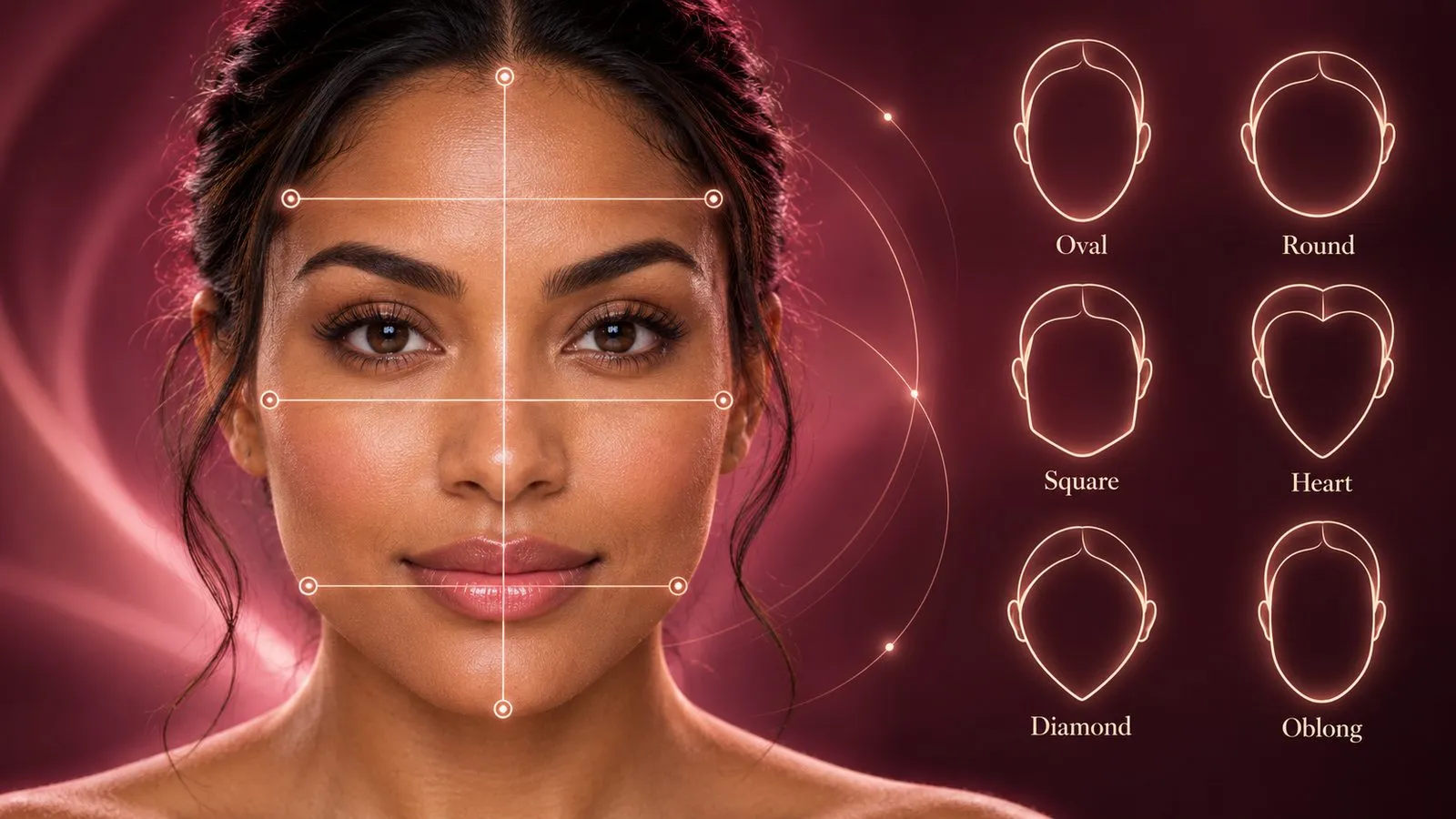
To find your face shape from a photo, compare your face length with its width, locate the widest part, and look at how the jaw narrows toward the chin. Use a straight-on picture with your hair pulled back and a relaxed expression. The closest match will usually be oval, round, square, heart, diamond, or oblong.
If you keep switching between two answers, start by checking the picture. A close selfie, a tilted chin, or hair covering the temples can make the same face read differently. A useful photo gives you a clearer starting point than trying to match yourself to a celebrity.
Get The Look’s facial analysis offers another way to compare those proportions: the app analyzes a selfie and returns a face-shape result with styling guidance. Below, we’ll cover how to prepare the photo, check the result yourself, and handle the cases where one label doesn’t quite fit.
Take a photo that shows your actual outline
Choose a picture for clarity rather than your favorite pose. You want to see the edges of your face without a hairstyle, expression, or camera angle doing the shaping.
- Expose the hairline and jaw. Pull loose hair back and clip away bangs. Keep the sides of your face visible. Remove glasses if the frames obscure your temples or cheeks.
- Face soft, even light. Stand facing a window or another broad light source. Deep side shadows can make one cheek or jaw corner harder to locate.
- Keep the camera at eye level. Look straight ahead with your head upright and shoulders level. Avoid lifting your chin, tucking it down, or turning to your preferred side.
- Give the camera some distance. If possible, prop your phone up and use a timer from around five feet away, then crop the photo. Keep enough detail to see the outline clearly. Avoid moving the phone very close just to fill the screen.
- Relax your expression and turn off reshaping filters. Leave your jaw unclenched and lips resting naturally. Include the whole forehead and chin in the frame.
Distance matters because perspective can change apparent proportions. A study of short-distance photographs modeled how a nose looks larger relative to facial width in a close selfie than in a photograph taken from five feet away. It studied nasal distortion, not face-shape classification; the practical takeaway here is to use a more distant reference photo when judging proportions.
Take a second picture in the same setup. If one looks noticeably wider or longer, check your head position before measuring either one.
Use Get The Look for facial analysis from your photo
If judging your own outline feels subjective, download Get The Look and use its face-shape analysis with a clear, front-facing photo. The app assesses facial proportions and identifies a match among its six shape categories: oval, round, square, heart, diamond, and oblong.
The result gives you a starting point for styling decisions. Alongside the shape, the report includes haircut suggestions and guidance for glasses and makeup. You can view a complete sample face analysis report before downloading. That page shows an example person’s result; your own analysis happens in the app.
For the most useful comparison:
- Choose the original photo. Use the clear reference you just took, rather than a portrait altered by a beauty filter or an AI hairstyle preview.
- Read the proportions behind the label. Compare the result with the visible width of your forehead, cheekbones, and jaw. A description such as “broader upper face with a narrower chin” is useful even if you also see traits of a neighboring shape.
- Connect the analysis to a style experiment. Use the recommendations to choose a few looks to preview on your own photo in Get The Look, then compare how each frames your features.
Analysis and try-on features are part of a paid subscription; check the current options in the app. Treat the face-shape result as a styling aid. An exact-sounding label doesn’t remove the uncertainty of a photo or decide which looks you’re allowed to enjoy.
Check four proportions in the same image
Open the photo large enough to see the edges. You can use a photo editor’s drawing tool to mark four reference lines, or simply compare them by eye. Keep all comparisons within that one image.
| Reference | Where to look | What you’re checking |
|---|---|---|
| Forehead width | Across the upper forehead between the visible sides, below the hairline | Whether the upper face is broader or narrower than the cheeks and jaw |
| Cheekbone width | Across the widest visible part of the upper cheeks | Whether the outline reaches its maximum width here |
| Jaw width and corners | Between the outer jaw corners, below the ears | Whether the lower face stays broad, curves inward, or has distinct angles |
| Face length | From the middle of the visible hairline to the bottom of the chin | Whether the face reads compact, moderately elongated, or distinctly long |
These are rough visual landmarks for a styling check. Don’t use the width of your hairstyle as forehead width, the tip of a beard as your chin, or the fullest part of a smile as your cheekbone reference.
You don’t need a universal ratio to the second decimal place. If two lines are almost equal, record them as similar. Small changes in where you place a mark can otherwise turn a minor difference into a misleading conclusion.
Match the pattern to a face shape
Use the whole outline. A pointed chin or angular jaw on its own isn’t enough to settle the category.
| Closest shape | Pattern to look for in your photo |
|---|---|
| Oval | Length exceeds width, the sides curve gently, and the jaw is a little narrower than the upper face. |
| Round | Length and width look relatively close, with a rounded lower outline and little emphasis on jaw corners. |
| Square | The forehead and jaw look similar in width, with visible jaw corners and a comparatively compact outline. |
| Heart | The upper face is broad relative to the jaw, and the outline narrows toward a smaller chin. |
| Diamond | The cheekbones stand out as the widest point, with both the forehead and lower face narrowing away from them. |
| Oblong | Length is the most noticeable feature, with a long outline and sides that may look relatively straight. |
Those six are the categories Get The Look uses. Other guides may split long faces into oval, oblong, and rectangle in different ways, so compare the descriptions when labels disagree.
Stuck between two shapes? Find the feature that separates them
Oval or round: look at length after removing the hair frame
Both can have soft edges. Check the distance from hairline to chin against the widest part of the face. If length stands out, oval is the more useful starting point; if the outline looks compact and rounded, consider round. Ignore height from a bun or volume at the crown.
Round or square: inspect the lower corners
Similar length and width can point toward either. Look below the cheeks: does the jaw make a distinct turn toward the chin, or follow a continuous curve? Use the jaw outline rather than cheek fullness alone. Clenching your teeth or a strong shadow can make this comparison harder.
Heart or diamond: compare forehead with cheekbones
A narrow chin can appear in both. For a heart-shaped pattern, the upper face stays relatively broad. For a diamond pattern, the cheeks project widest while the temples and forehead look narrower. Pulling hair away from the temples is particularly helpful here.
Oval or oblong: describe how dominant the length feels
Both are longer than wide. Oblong is a useful description when that length is the defining trait; oval describes a more gently elongated outline. If neither answer feels decisive, write down “longer face, softly tapered jaw.” That gives you something concrete to use without forcing a boundary.
Why do two photos or analyses give different answers?
Check the inputs before assuming your face has changed. Compare camera distance, head angle, expression, hair coverage, and any filter settings. A three-quarter portrait and a straight-on reference aren’t equivalent views of the outline.
If two clear, similarly framed photos still suggest neighboring shapes, keep both possibilities. Classification compresses several proportions into one word, and your features may sit near a category boundary. You might have a long outline with a broad jaw, for example; both observations are more informative than repeatedly retaking photos to chase one answer.
The useful stopping point is when you can describe your proportions consistently. You don’t need every photo or tool to return the same word before choosing a hairstyle.
Turn your result into a styling choice
Once you have a likely shape, move to our guide to what haircut suits your face shape for cut suggestions. If you want a barber-focused shortlist, use men’s hairstyles by face shape. Those guides cover the styling choices in detail.
For a shortlist tailored to your result, explore hairstyles for oval faces, round faces, square faces, or heart-shaped faces. Each guide compares cuts by length, texture, and the effect you want around your features.
In Get The Look, use your facial analysis to choose a few contrasting hairstyle previews. Compare where the fringe falls, where the ends sit, and where the style adds volume around your face. Our hairstyle try-on walkthrough explains that next step.
Keep your natural texture, density, hairline, and daily routine in the decision. Your face-shape result helps you describe the frame you’re working with; your preferences decide what you want that frame to do.
FAQs
- Does a mirrored selfie change my face shape result?
- A simple horizontal flip swaps left and right without changing overall length or width. Camera angle, close distance, and filters that reshape features are more useful things to check when two photos give different impressions.
- Can I tell my face shape if I have bangs or a beard?
- Clip bangs back so the forehead and hairline are visible. A beard can hide the jaw and chin, so use a suitable clean-shaven photo if you already have one, or treat the lower-face outline as uncertain. You do not need to shave just to get a label.
- Do I need to measure my face in centimeters?
- No. For a photo-based check, compare relative widths and length within the same image. Pixel distances cannot give real-world centimeters without a scale, and small differences in landmark placement should not decide the result.
- Is a widow’s peak enough to identify a heart-shaped face?
- No. A widow’s peak describes the center of the hairline. To assess a heart-shaped outline, also check whether the upper face is broader than the jaw and tapers toward the chin. A hairline detail alone does not establish the overall shape.